Introduction: When Your Remote Fails
There are few things more frustrating than settling in for a cozy evening by the fire, only to discover that your gas fireplace remote control has stopped working. Whether the buttons are unresponsive, the signal has become unreliable, or the remote has simply been lost, the convenience of a remote-controlled fireplace quickly turns into an inconvenience. Fortunately, finding a gas fireplace remote control replacement is a straightforward process once you understand the key factors involved.
This comprehensive guide will walk you through everything you need to know about replacing your gas fireplace remote. We'll cover the different types of remotes available, how to identify the correct replacement for your specific fireplace model, the differences between universal and OEM (Original Equipment Manufacturer) options, and a step-by-step pairing process. We'll also address common troubleshooting issues and provide maintenance tips to help your new remote last for years to come.
Before diving into the replacement process, it's helpful to have a basic understanding of your fireplace's overall system. If you're new to gas fireplace ownership, our beginner's guide to fireplaces provides a solid foundation. For those who want to understand the inner workings of their unit, our article on gas fireplace parts explains the various components, including the receiver module that communicates with your remote.
Types of Gas Fireplace Remote Controls
Not all gas fireplace remotes are created equal. The type of remote your fireplace uses depends on the manufacturer, the model, and the features of your specific unit. Understanding these categories will help you narrow down your replacement options.
1. Basic On/Off Remotes
These are the simplest type of remote, typically found on entry-level gas fireplace models. They perform a single function: turning the fireplace on and off. They usually operate via a simple radio frequency (RF) or infrared (IR) signal and do not offer any temperature control or flame modulation.
2. Thermostatic Remotes
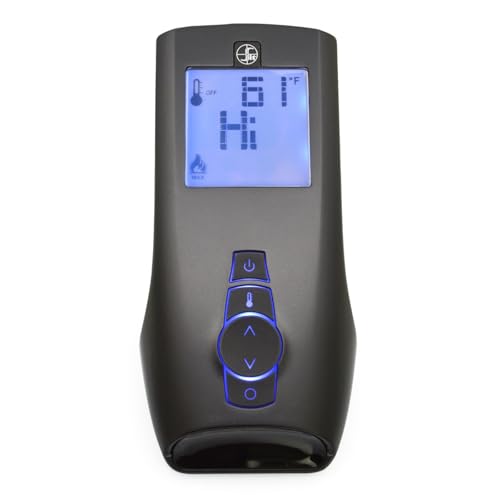
Mid-range and premium gas fireplaces often come with thermostatic remotes. These remotes include a built-in thermostat that allows you to set a desired room temperature. The remote communicates with the fireplace's receiver to automatically adjust the flame height or cycle the burner on and off to maintain that temperature. This feature is excellent for maintaining consistent comfort and improving energy efficiency. For a deeper dive into how thermostats work with fireplaces, see our fireplace thermostat guide.
3. Programmable and Smart Remotes
High-end models may feature programmable remotes that allow you to set schedules for your fireplace to turn on and off at specific times. Some modern systems even offer smart home integration, allowing you to control your fireplace via a smartphone app or voice assistant. If you're interested in this level of control, you might explore options for a smart Wi-Fi fireplace controller.
Note: The type of remote you need is determined by the receiver module installed in your fireplace, not just the remote itself. The remote and receiver must be compatible in terms of frequency and communication protocol.
How to Find the Right Replacement Remote
The key to a successful replacement is identifying the correct remote for your specific fireplace. Here's a step-by-step approach.
Step 1: Identify Your Fireplace Make and Model
Locate the rating plate or data tag on your gas fireplace. This is typically found behind the lower access panel, near the gas valve, or on the side of the firebox. The plate will list the manufacturer (e.g., Majestic, Heat & Glo, Empire, Monessen) and the model number. This information is crucial for finding a compatible remote.
Step 2: Check Your Owner's Manual
If you still have the owner's manual, it will often list the specific remote control model number and may even provide a part number for ordering a replacement. If you don't have the manual, many manufacturers offer digital versions on their websites.
Step 3: Look for a Part Number on the Old Remote
If you still have the old remote, even if it's not working, check the back of the remote or inside the battery compartment. There is often a model number or part number printed there. Searching for this number online is the most direct way to find an exact replacement.
Step 4: Contact the Manufacturer
If you're unable to find the information on your own, contacting the fireplace manufacturer's customer support with your model number is a reliable way to get the correct part number for a replacement remote.
Step 5: Consider a Universal Remote
If an OEM remote is no longer available or is cost-prohibitive, a universal gas fireplace remote may be a viable alternative. However, compatibility is not guaranteed, so you must carefully check the specifications. We'll discuss this in more detail in the next section.
Once you've identified the correct part, you may also want to consider replacing other worn components. For instance, if your fireplace has a blower, our guide on gas fireplace blower fans can help you understand that system better.
Universal vs. OEM Remotes: Which Is Better?
When searching for a gas fireplace remote control replacement, you'll generally encounter two main options: OEM (Original Equipment Manufacturer) remotes and universal remotes. Each has its own advantages and disadvantages.
| Feature | OEM Remote | Universal Remote |
|---|---|---|
| Compatibility | Guaranteed to work with your specific fireplace model. | May or may not work; requires careful research to ensure compatibility with your receiver. |
| Ease of Setup | Typically plug-and-play or requires a simple pairing process outlined in the manual. | Often requires a more complex programming or "learning" process. |
| Features | Matches the original features of your fireplace (e.g., thermostat, flame height). | Features may be limited or may not map perfectly to your fireplace's functions. |
| Availability | Can be difficult to find for older or discontinued models. | Widely available online and in stores. |
| Value | Positioned in the mid-range to premium tier, reflecting its specific design and guaranteed fit. | Generally entry-level to mid-range, offering a budget-friendly alternative if compatible. |
Recommendation: An OEM remote is almost always the best choice if it's available and fits your budget. It guarantees compatibility and a seamless user experience. A universal remote should be considered a fallback option, and you should only purchase one if you have confirmed with the seller or manufacturer that it is compatible with your specific fireplace receiver. For more information on general fireplace accessories, explore our fireplace accessories section.
Step-by-Step Pairing and Setup Guide
Once you have your replacement remote, you'll need to pair it with your fireplace's receiver. The exact process varies by manufacturer, but the general steps are similar. Always consult the instructions that come with your new remote for the most accurate procedure.
General Pairing Steps:
- Power Down the Fireplace: Turn off the fireplace and, if possible, shut off the gas supply or the electrical power to the unit at the breaker. This is a safety precaution.
- Locate the Receiver Module: The receiver is typically a small box located behind the lower access panel or near the gas valve. It will have an antenna or a small "learn" button.
- Put the Receiver in Pairing Mode: Press and hold the "learn" or "pair" button on the receiver module until an indicator light begins to flash or a beep is heard. This usually takes 3-5 seconds.
- Send the Pairing Signal from the Remote: While the receiver is in pairing mode, press a specific button on the remote (often the "on" or "power" button) within a certain timeframe (e.g., 10-30 seconds).
- Confirm the Pairing: The receiver's indicator light should stop flashing and remain solid, or you may hear a confirmation beep. This indicates that the remote and receiver are now paired.
- Test the Remote: Restore power to the fireplace and test the remote's functions to ensure it's working correctly.
Important: Some remotes come pre-paired, while others require this manual process. If your fireplace has a wall switch, it may need to be in a specific position (e.g., "on" or "remote") for the remote to function. Our article on fireplace wall switches and timers explains this in more detail.
Troubleshooting: When a New Remote Doesn't Work
If you've installed a new remote and it's not working, don't panic. There are several common issues you can troubleshoot. For a broader look at fireplace issues, our fireplace troubleshooting guide is a great resource.
Common Problems and Solutions:
- Batteries: This is the most common culprit. Ensure the batteries in the new remote are fresh and installed correctly. Check the receiver's power source as well; some receivers are powered by the fireplace's millivolt system, while others need their own batteries.
- Pairing Failure: Repeat the pairing process. Make sure you are following the timing requirements exactly. If the receiver doesn't enter pairing mode, it may be faulty.
- Interference: Other wireless devices in your home (like Wi-Fi routers, cordless phones, or baby monitors) can interfere with the RF signal. Try moving the remote closer to the fireplace or temporarily turning off other devices to see if that resolves the issue.
- Incompatible Remote: If you purchased a universal remote, double-check its compatibility. The frequency (e.g., 315 MHz, 433 MHz) must match your receiver.
- Faulty Receiver: In rare cases, the receiver module itself may be faulty. If you've confirmed the remote is working and paired correctly, the receiver may need to be replaced. Our guide on gas fireplace troubleshooting can help you diagnose further.
- Wall Switch Setting: As mentioned earlier, ensure your wall switch is set to "remote" or "on" mode, not "off."
If your fireplace is not turning on at all, even with the remote, the issue might be with the ignition system. Our article on gas fireplace won't light covers common ignition problems.
Maintenance Tips to Extend Remote Life
A little care can go a long way in ensuring your replacement remote lasts. Here are some simple maintenance tips:
- Keep It Clean: Wipe the remote with a dry, soft cloth. Avoid using harsh chemicals or excessive moisture.
- Protect from Heat: Do not leave the remote on top of the fireplace or in direct sunlight. Excessive heat can damage the internal components.
- Replace Batteries Regularly: Don't wait for batteries to leak. Replace them proactively, especially before the heating season. Our guide on seasonal fireplace maintenance includes a checklist for remote and receiver upkeep.
- Store Properly: When not in use during the off-season, remove the batteries and store the remote in a cool, dry place. Our article on summer fireplace care offers more tips for the off-season.
- Avoid Drops: Handle the remote carefully. A fall can damage the internal circuit board or buttons.
Frequently Asked Questions
Can I use any universal remote for my gas fireplace?
No, not all universal remotes are compatible with all gas fireplaces. The remote must match the frequency and communication protocol of your fireplace's receiver. You must verify compatibility with your specific fireplace make and model before purchasing a universal remote.
How do I find my gas fireplace model number?
The model number is typically located on a rating plate or data tag. This tag is usually found behind the lower access panel, near the gas valve, or on the side of the firebox. It will list the manufacturer and model number.
My new remote is paired, but the fireplace won't turn on. What should I check?
First, check the batteries in both the remote and the receiver. Next, ensure the wall switch (if you have one) is set to the "remote" or "on" position. If the fireplace still doesn't respond, there may be an issue with the ignition system or the receiver itself. Refer to our gas fireplace won't light guide for further troubleshooting.
Can I replace just the remote, or do I need a new receiver too?
In most cases, you can replace just the remote as long as it is compatible with your existing receiver. However, if your receiver is faulty or you are switching to a different remote technology (e.g., from a basic on/off to a thermostatic remote), you may need to replace both the remote and the receiver as a set. Our guide on gas fireplace parts can help you identify the receiver.
Conclusion: Restoring Convenience to Your Fireplace
Replacing a gas fireplace remote control doesn't have to be a daunting task. By identifying your fireplace's make and model, choosing between an OEM or compatible universal remote, and following the correct pairing procedure, you can restore the convenience and comfort of remote-controlled operation in no time.
Remember to prioritize compatibility and quality. While a universal remote might seem like an easy solution, an OEM remote guarantees a perfect fit. With the right replacement remote in hand and the troubleshooting tips provided in this guide, you'll be enjoying cozy, effortless fires for many seasons to come. For more information on maintaining your fireplace and its accessories, explore our fireplace maintenance section.