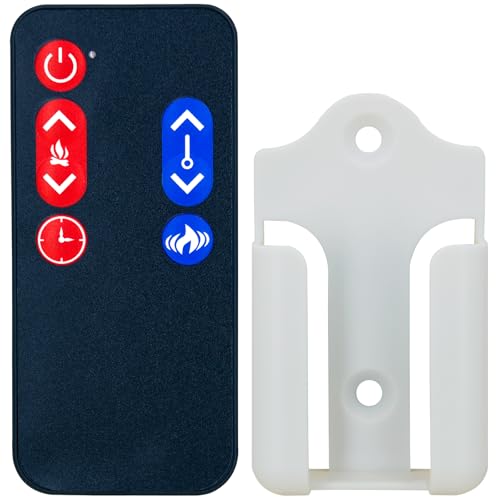
Universal Remote for Electric Fireplace
Your complete guide to finding, pairing, and using a universal remote to simplify control of your electric fireplace
START EXPLORINGWhy a Universal Remote? Losing your electric fireplace remote can be frustrating. A universal remote consolidates control of your fireplace and other devices into one convenient handset, eliminating clutter and the need to juggle multiple remotes.
Why You Might Need a Universal Remote
Electric fireplaces are prized for their convenience. Unlike wood or gas models, they require no venting, produce no emissions, and can be installed almost anywhere. However, that convenience often hinges on a single, small remote control that is easy to misplace, damage, or lose entirely. When that happens, many homeowners assume they need to contact the manufacturer or buy an expensive replacement.
Fortunately, a universal remote for electric fireplace models offers a practical and often more affordable solution. These remotes are designed to learn the infrared (IR) signals from your original handset, effectively cloning its functions. This means you can regain full control over your fireplace's power, flame intensity, heat settings, and timer functions without needing a proprietary replacement.
Beyond replacing a lost remote, universal remotes offer the benefit of consolidation. If you already use a universal remote for your TV, soundbar, or streaming device, adding your fireplace to the mix means one less remote to keep track of. This is particularly appealing in living rooms where multiple devices are common.
How Do Universal Remotes Work with Electric Fireplaces?
Most electric fireplaces communicate with their remotes using infrared (IR) light signals, similar to how a TV remote works. The remote sends a specific code when you press a button, and a sensor on the fireplace receives that code and executes the command. A universal remote is equipped with a large database of codes from various manufacturers and a "learning" function that can capture signals from your original remote.
There are two primary methods for setting up a universal remote:
- Code Entry: You look up the code for your fireplace brand and model in the remote's manual or online database and enter it using the keypad. This is the quickest method if your brand is well-supported.
- Learning Mode: If a code is not available, the universal remote can "learn" the signal by pointing your original fireplace remote at it and pressing the corresponding buttons. This method is highly effective but requires a working original remote.
It is important to note that not all electric fireplaces use IR. Some higher-end models may use radio frequency (RF) signals, which are not line-of-sight and can pass through walls. RF remotes are generally not compatible with standard universal remotes. Always check your fireplace's manual to confirm its remote technology. If you are unsure, a quick look at the remote itself can help; IR remotes require a clear line of sight to the fireplace, while RF remotes do not.
Key Features to Look for in a Universal Remote
Not all universal remotes are created equal. When shopping for one to control your electric fireplace, consider the following features to ensure compatibility and ease of use:
- Learning Capability: This is non-negotiable. Ensure the remote has a learning function in case your fireplace's specific code is not in its database. This feature future-proofs your purchase.
- Code Library Size: A larger code library increases the chance of finding a direct match for your fireplace brand, which simplifies setup. Brands like GE, RCA, and Philips often have extensive libraries.
- Backlit Buttons: If you often use your fireplace in the evening with dim lighting, a backlit remote is a significant convenience. It allows you to see the buttons without turning on a lamp.
- Macro Functions: Some advanced remotes allow you to program a single button to execute a sequence of commands, such as turning on the fireplace and setting the flame to a specific level. This is a nice-to-have for streamlining your routine.
- Ergonomics and Durability: A remote that feels comfortable in your hand and has a sturdy build will last longer and be more pleasant to use daily.
When comparing options, consider the tier of the remote. Entry-level models typically offer basic learning and a modest code library. Mid-range remotes often include backlighting and a larger database. Premium and luxury universal remotes may feature touchscreens, RF capability, and advanced macro programming, though RF is not typically needed for electric fireplaces.
Compatibility: Will a Universal Remote Work with Your Fireplace?
Compatibility is the most critical factor. While many electric fireplace brands use standard IR protocols, some use proprietary signals. Before purchasing, check the following:
- Brand Support: Major brands like Dimplex, ClassicFlame, Duraflame, and Twin Star often have codes available in popular universal remote databases. Lesser-known brands may require the learning method.
- Remote Type: As mentioned, IR is generally compatible; RF is not. Check your fireplace manual or the original remote for clues.
- Function Mapping: Even if the remote works, not all buttons may map correctly. A learning remote allows you to assign functions to buttons manually, ensuring full control.
If you are unsure about your fireplace's compatibility, the safest bet is a universal remote with a strong learning function. This ensures that even if a pre-programmed code doesn't exist, you can still teach the remote the necessary commands from your original handset. For those who have lost their original remote, you may need to contact the manufacturer for a replacement or consider a remote that explicitly lists your fireplace model as compatible.
It's also worth noting that some electric fireplaces have a physical control panel that can be used if a remote is unavailable. However, this often means getting up to adjust settings, which defeats the purpose of the remote. A universal remote restores the convenience you expect.
Step-by-Step: How to Set Up Your Universal Remote
Setting up a universal remote for your electric fireplace is typically a straightforward process. Here is a general guide that applies to most models:
- Check the Manual: Start by reading the manual that came with your universal remote. It will provide specific instructions and a list of codes for various brands.
- Power On Your Fireplace: Make sure your electric fireplace is plugged in and turned on (either via the physical switch or the original remote if you have it).
- Enter Programming Mode: Follow the remote's instructions to enter programming or learning mode. This usually involves holding a specific button for a few seconds until an indicator light turns on.
- Enter a Code: If using a code, enter the first code listed for your fireplace brand. Test the buttons (power, flame, heat). If they work, you're done. If not, try the next code.
- Use Learning Mode: If codes don't work, enter learning mode. Point your original fireplace remote at the universal remote's IR sensor (usually at the top). Press a button on the original remote, then press the corresponding button on the universal remote to assign the function. Repeat for all necessary buttons.
- Test and Save: Once all functions are mapped, exit programming mode and test the remote thoroughly. Save your settings if the remote has memory.
If you encounter issues, consult the troubleshooting section below or refer to the remote's manual. Patience is key, especially with the learning method.
Troubleshooting Common Universal Remote Issues
Even with careful setup, you might run into problems. Here are some common issues and how to resolve them:
- Remote Not Responding: Check the batteries first. Ensure they are inserted correctly and have a charge. If the remote has a backlight, see if it turns on. If not, replace the batteries.
- Fireplace Not Responding to Remote: Ensure there is a clear line of sight between the remote and the fireplace's sensor. Remove any obstructions. If the remote works for other devices but not the fireplace, the code or learning may be incorrect. Try re-programming.
- Some Buttons Not Working: This often indicates that the code you used doesn't fully match your fireplace's protocol. Try a different code or use the learning mode to manually map the missing buttons.
- Remote Works Intermittently: Weak batteries or a dirty IR sensor on the fireplace can cause this. Clean the sensor with a soft, dry cloth and replace the batteries.
- Remote Cannot Learn from Original: Ensure the original remote has working batteries and is emitting a signal (you can test this by viewing the IR emitter through a smartphone camera; you should see a faint purple light when pressing a button). Also, ensure the two remotes are not too close or too far apart during learning; a distance of 1-2 inches is usually ideal.
For more specific issues related to electric fireplace remotes, you can refer to our guide on electric fireplace remote fixes. If your fireplace is not heating, that's a separate issue covered in our troubleshooting guide.
Alternatives to a Universal Remote
While a universal remote is a great solution, it's not the only option. Depending on your situation, consider these alternatives:
- Manufacturer Replacement: Ordering a replacement remote directly from the manufacturer ensures perfect compatibility. However, it can be more expensive and may take time to ship.
- Smartphone Apps: Some electric fireplaces come with Wi-Fi or Bluetooth capabilities, allowing you to control them via a smartphone app. If your fireplace has this feature, you may not need a physical remote at all. Check our guide on smart Wi-Fi fireplace controllers for more information.
- Wall Switch or Thermostat: Many electric fireplaces can be controlled by a wall switch or an external thermostat. This is a permanent solution but lacks the portability of a remote. Learn more about fireplace thermostats and wall switches and timers.
- Physical Control Panel: As a last resort, you can always use the control panel on the fireplace itself. It's not as convenient, but it works.
If you are considering a replacement remote, our article on electric fireplace remote control replacement provides detailed guidance. For those who prefer a universal option, the products below are a great starting point.
Maintenance and Care for Your Universal Remote
To ensure your universal remote lasts, follow these simple care tips:
- Keep it Dry: Remote controls are not waterproof. Keep them away from spills and humidity.
- Avoid Extreme Heat: Do not leave the remote on top of the fireplace or in direct sunlight, as heat can damage the internal components.
- Replace Batteries Regularly: Don't wait for batteries to leak. Replace them annually or when you notice decreased responsiveness.
- Clean Gently: Wipe the remote with a soft, dry cloth. Avoid harsh chemicals or abrasive materials.
- Store Properly: When not in use, keep the remote in a designated spot, like a drawer or a remote caddy, to prevent loss or damage.
Proper care extends the life of your remote and ensures reliable operation. It's also a good idea to keep a spare set of batteries on hand.
Final Thoughts
A universal remote for your electric fireplace is a smart, cost-effective way to regain control and simplify your device management. By understanding how these remotes work, checking compatibility, and following a careful setup process, you can enjoy the warmth and ambiance of your fireplace with the push of a button—no need to search for a lost proprietary remote.
Whether you're replacing a lost remote or simply want to consolidate your devices, the options below are among the best available. Remember to consider features like learning capability, code library, and ergonomics to find the perfect match for your needs. With the right universal remote, you can sit back, relax, and enjoy your electric fireplace effortlessly.