Smart Home Fireplace Integration
Transform your fireplace into an intelligent, connected centerpiece. Learn how to control flames, heat, and ambiance with your voice, phone, or automation routines.
Start Your IntegrationThe modern home is becoming increasingly connected, and the fireplace is no exception. Smart home fireplace integration allows you to control your fireplace remotely, schedule heating, and sync it with other smart devices for a truly seamless experience. Whether you're researching a new purchase or looking to upgrade an existing unit, understanding how smart technology works with fireplaces is essential for making an informed decision.
This guide will walk you through the benefits, compatibility options, and practical steps to integrate a fireplace into your smart home ecosystem. By the end, you'll know exactly which features matter and how to choose a model that fits your lifestyle.
Why Smart Integration Matters: A connected fireplace offers convenience, energy savings, and enhanced safety. You can warm up your living room before you arrive home, turn off the fire from your bed, or receive alerts if something is wrong—all from your smartphone.
Key Benefits of a Smart Fireplace
📱 Remote Control
Adjust flame height, heat output, and timers from anywhere using a mobile app. Perfect for busy households.
🗣️ Voice Assistance
Pair with Amazon Alexa or Google Assistant to turn your fireplace on or off with simple voice commands.
⚙️ Automation & Scheduling
Create routines that automatically turn on the fireplace when the temperature drops or when you arrive home.
🔋 Energy Efficiency
Smart thermostats and timers prevent unnecessary usage, helping you save on energy bills without sacrificing comfort.
🛡️ Enhanced Safety
Receive notifications if the fireplace is left on, or integrate with smoke detectors for automatic shut-off.
🎵 Ambiance Sync
Some systems can sync flame effects with smart lights or music for a fully immersive atmosphere.
Which Fireplaces Can Be Integrated?
Not all fireplaces are smart-ready out of the box, but many can be upgraded. Here's a breakdown by type:
| Fireplace Type | Smart Integration Potential | Recommended Approach |
|---|---|---|
| Electric Fireplaces | High – Many models include built-in Wi-Fi, app control, and voice assistant compatibility. | Look for models with native smart features. For older units, use a smart plug or IR blaster. |
| Gas Fireplaces | Moderate – Can be integrated with smart thermostats or remote control kits, but require professional installation. | Use a smart gas valve controller or a Wi-Fi-enabled remote system. Always consult a licensed technician. |
| Wood Burning Fireplaces | Low – Limited to monitoring and safety sensors; actual fire control is manual. | Integrate smart sensors for temperature, smoke, and CO detection. Use smart damper controllers if available. |
| Ethanol Fireplaces | Moderate – Some models offer electronic ignition and app control, but fewer options exist. | Check for models with Bluetooth or Wi-Fi control. Smart plugs can manage power to electronic ignition systems. |
| Ventless Fireplaces | Moderate – Similar to gas; smart kits are available but require careful installation. | Use smart thermostats and remote shut-off devices. Ensure proper ventilation monitoring. |
For a deeper dive into each type, explore our guide on types of fireplaces explained. If you're still deciding which fireplace is right for your home, our buying guide can help.
Step-by-Step Integration Guide
Integrating a fireplace into your smart home doesn't have to be complicated. Follow these steps to ensure a smooth setup:
- Assess Your Fireplace: Determine if your model has built-in smart features or if you'll need external adapters. Electric fireplaces often have the easiest path to integration.
- Choose Your Ecosystem: Decide whether you want to use Amazon Alexa, Google Home, Apple HomeKit, or a universal hub like SmartThings. This will guide your product choices.
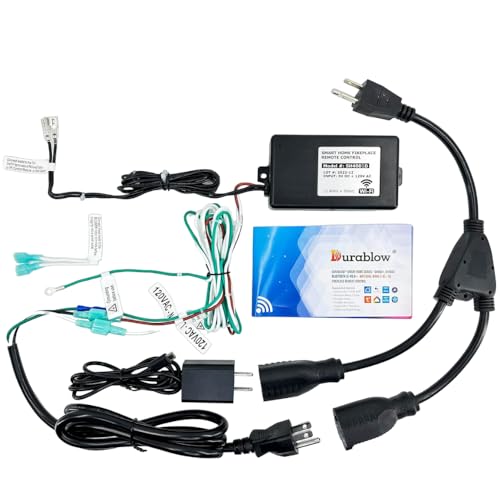
- Select Smart Controllers: For non-smart fireplaces, consider a smart plug for electric models, a Wi-Fi remote kit for gas, or a smart thermostat for temperature control. Our article on smart Wi-Fi fireplace controllers covers top options.
- Install and Connect: Follow the manufacturer's instructions carefully. For gas or wood-burning units, always hire a professional. If you're handy, our DIY electric fireplace guide can help with electric models.
- Set Up Routines: Use your smart home app to create schedules, triggers, and scenes. For example, "Turn on fireplace when I say 'Alexa, movie time'."
- Test and Optimize: Ensure everything works reliably. Check for firmware updates and adjust settings for optimal performance.
Ready to upgrade your fireplace? Our recommended products below include smart-compatible models that are easy to integrate.
View Smart FireplacesSmart Home Ecosystem Compatibility
Your choice of smart home platform will influence which fireplace you buy. Here's a quick compatibility overview:
| Ecosystem | Compatible Fireplace Features | Notes |
|---|---|---|
| Amazon Alexa | Voice control, routines, skills | Widely supported by electric fireplace manufacturers. Look for "Works with Alexa" certification. |
| Google Home | Voice control, routines, Google Assistant | Similar to Alexa; many smart fireplaces support both. Check product listings for compatibility. |
| Apple HomeKit | Voice control via Siri, automation | Less common but growing. HomeKit-compatible fireplaces are typically premium models. |
| Samsung SmartThings | Hub-based control, automation | Works with a variety of devices; requires a SmartThings hub for full functionality. |
| Universal Wi-Fi Apps | Direct app control, scheduling | Many brands offer their own apps. These can sometimes be integrated via IFTTT or other services. |
When shopping, always verify compatibility with your preferred ecosystem. For electric models, features like remote control and thermostat integration are good indicators of smart readiness.
Maintenance and Troubleshooting
Smart fireplaces require similar maintenance to traditional ones, plus a few extra considerations for the electronic components.
- Firmware Updates: Keep your fireplace's software up to date to ensure security and feature improvements.
- Wi-Fi Connectivity: If your fireplace loses connection, try resetting the router or the fireplace's network settings. Our guide on how to reset an electric fireplace can help.
- Sensor Cleaning: Dust can affect smart sensors. Regularly clean vents and sensors as part of your fireplace maintenance checklist.
- App Issues: If the app isn't working, check for updates, reinstall, or contact support. For remote-specific issues, see remote control troubleshooting.
For a comprehensive maintenance routine, refer to our monthly and yearly maintenance schedule.
Frequently Asked Questions
Can I integrate a fireplace I already own?
It depends on the type. Electric fireplaces can often be made smart with a smart plug or by replacing the remote with a Wi-Fi kit. Gas and wood-burning fireplaces are more challenging and may require professional modifications. Always prioritize safety and consult a technician.
Do smart fireplaces require a subscription?
Most smart fireplaces do not require a subscription for basic app control and voice commands. However, some advanced features or cloud services might have optional fees. Check the manufacturer's details before purchasing.
Is it safe to leave a smart fireplace on unattended?
While smart fireplaces often include safety features like auto-shutoff and timers, it's generally recommended not to leave any fireplace completely unattended for extended periods. Use the smart features to monitor and control it, but follow the manufacturer's safety guidelines. See our article on leaving a fireplace on overnight for more details.
Will a smart fireplace work during a power outage?
Electric fireplaces will not work without power. Gas fireplaces with electronic ignition may also fail, though some models have battery backups. Wood-burning fireplaces can still be used manually. Consider a backup plan for emergencies.
How do I choose the right smart fireplace for my home?
Consider your existing smart home ecosystem, the level of control you want, and your budget tier. Entry-level smart fireplaces offer basic app control, while premium models include advanced automation and voice integration. Our fireplace buying guide provides a detailed framework.
Can smart fireplaces help reduce energy costs?
Yes. By scheduling usage, using thermostatic control, and integrating with your smart home's energy-saving routines, you can avoid wasted heat. For more tips, read our fireplace energy saving tips.
Final Thoughts
Smart home fireplace integration is more than a trend—it's a practical upgrade that enhances convenience, safety, and efficiency. Whether you're buying a new fireplace or retrofitting an existing one, the key is to choose a solution that aligns with your smart home ecosystem and lifestyle.
As you explore the recommended products below, keep in mind the compatibility, features, and tier that best suit your needs. With the right smart fireplace, you can enjoy the warmth and ambiance of a fire with the modern control you expect from a connected home.